
Advanced Features
Documentation topics
Ingredient Sections
Ingredient Sections allow you to group ingredients into clearly defined categories based on the cooking procedures required to produce your recipe.

Using a drag-and-drop interface, you can organize ingredients as needed—for example, separating wet ingredients (e.g., eggs, milk) and dry ingredients (e.g., flour, sugar) when baking a cake, or isolating a group for an icing, dressing, or sauce.
In some cases, it may be more practical to create a separate recipe for such components and import it using the Recipes as Ingredients feature, detailed below.
Recipe Versioning
Experimenting with recipes often involves incremental changes, but recalling the details of each version can be difficult. You might improve a recipe over time yet wish to revisit an earlier version—like "version two"—for its unique qualities, only to find the proportions lost. In commercial cooking, where experimentation is standard, tracking a recipe’s evolution—not just its latest state—is invaluable.
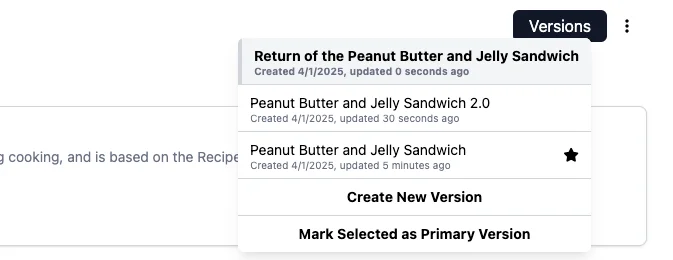
KitchenSync provides dedicated versioning tools via the Version Control button, located next to the top-right menu on the recipe page. Clicking it opens a dropdown displaying the current version, any associated versions, a "Create New Version" button to generate a linked copy, a "Mark as Primary" button to designate the active recipe as the main one, and a star indicating the primary version. Add notes in each recipe’s description to document changes and experimental outcomes, maintaining a clear history of your work.
Recipes as Ingredients
If you produce a recipe — like a sauce, spice mix, or dressing — that becomes a component in another recipe, KitchenSync supports this workflow. After creating the standalone recipe, click the top-right menu button on the recipe page and select "Generate Ingredient."
This adds an ingredient to your database with the same name and nutrition as the recipe. The recipe's cost is not carried over yet, so add a price to the new ingredient yourself if you use it in costed recipes. When you save changes to the original recipe, the linked ingredient's nutrition updates, and so does every recipe that contains it. To modify the recipe without affecting existing uses, create a new version as described in Recipe Versioning.
If you need to override the autogenerated ingredient name, please contact us to request prioritization of this feature.
Excluded Sugars
Sugar alcohols (e.g., erythritol, sorbitol, mannitol) are not counted as sugars on a nutrition label, though they are part of Total Carbohydrate. FDA lets you declare them on a separate line under Total Carbohydrate. The line is voluntary, but it becomes required when the label makes a claim about sugar, sugar alcohol or sugars (21 CFR 101.9(c)(6)(iv)).
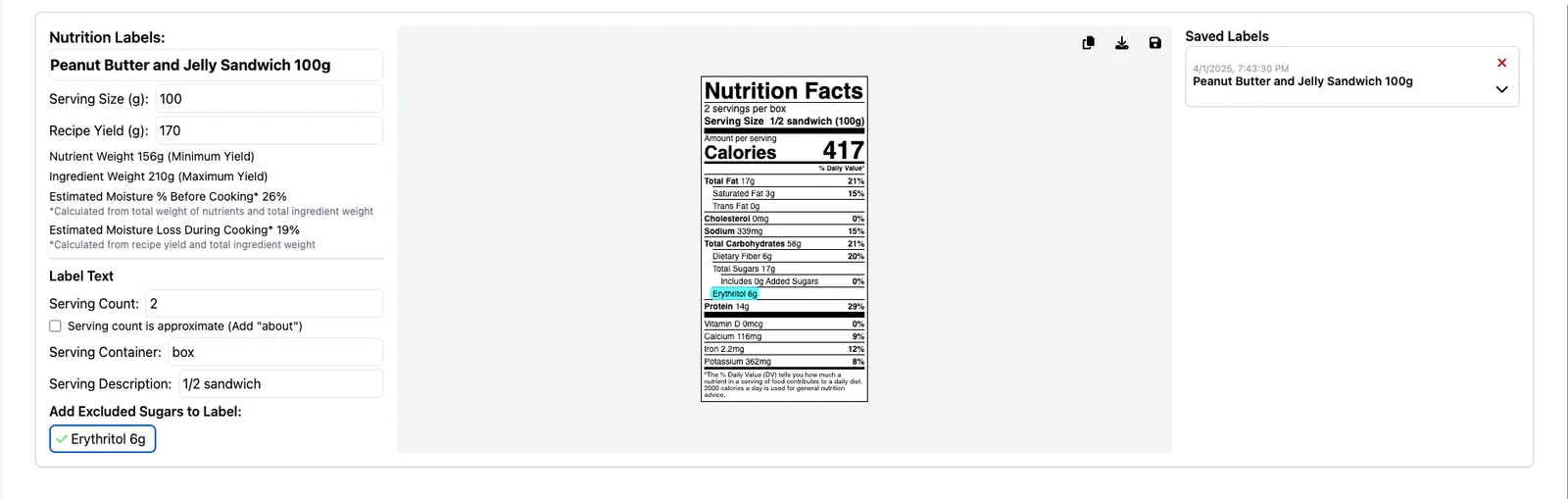
KitchenSync lists every ingredient with more than 90 g of carbohydrate per 100 g as a candidate. That includes sweeteners like erythritol, but also ordinary sugar, so pick only the ingredients that belong on the line. Candidates appear under "Excluded Sugars" on the Nutrition Label Panel. Each one you toggle is added as its own line on your exported label, showing its weight per serving. The toggle doesn't change any other value on the label.